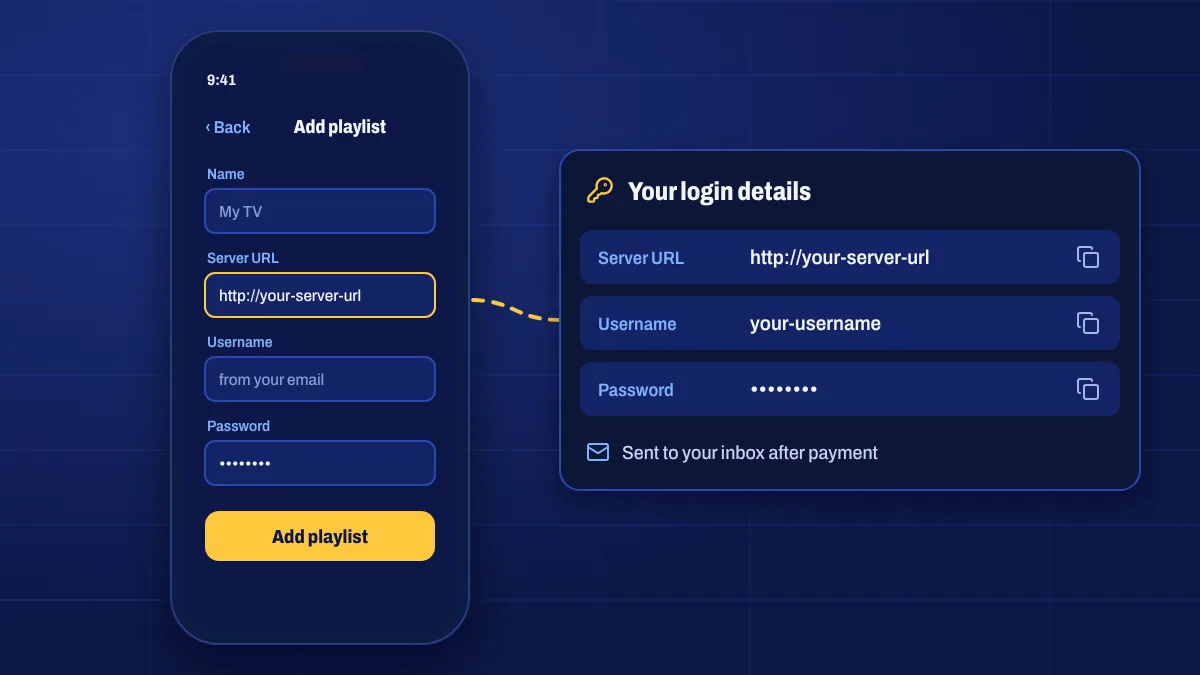
On Apple devices you watch Apollo Group TV through an IPTV player app from the App Store. Setup takes a few minutes: install the player, add your login details and let the channels load.
iPhone and iPad
- Open the App Store and install the IPTV player recommended in your welcome email.
- Open the app and choose Add playlist, Add user or Login (the wording depends on the app).
- Choose the login type that matches your email: usually Xtream Codes / server login or M3U playlist URL.
- Enter the server address, username and password, or paste the playlist link, exactly as shown.
- Save and wait while the channels, on-demand library and TV guide load.
Copy and paste the details from My subscription on the same device to avoid typing mistakes.
Apple TV
- On Apple TV, open the App Store and install the recommended player.
- Open it and choose to add a playlist or login.
- Many players let you add your details from your iPhone or a web page by scanning a code, which is much faster than typing with the remote.
- Save, then wait for the channels to load.
For live sport on Apple TV 4K, a wired Ethernet connection gives the steadiest picture.
Getting the most out of the player
- Enable the TV guide (EPG) in the player’s settings if it isn’t on by default.
- Turn on catch-up if the player supports it. See catch-up TV.
- Use HD on mobile data to save data; switch to Full HD or 4K on Wi-Fi.
Troubleshooting
- “Login failed”: check the server address includes everything shown, including the port number if there is one, and that there are no spaces.
- No channels appear: make sure your subscription is active and try reloading the playlist from the player’s settings.
- No TV guide: refresh or update the EPG in the player and check your time zone.
iOS setup questions
Is the player app free?
Many players are free with optional paid features. Any purchase in the player goes to its developer, not to us.
Can I use AirPlay to watch on my TV?
Yes, but running the player on Apple TV directly gives a smoother picture for live TV.
Which login type should I choose?
Use the type shown in your welcome email. Server login (often called Xtream Codes) usually gives the best experience with categories and the TV guide.